Comment acheter via CNBuyHub
Étape 1 : Sélectionnez les produits
📋 Method 1
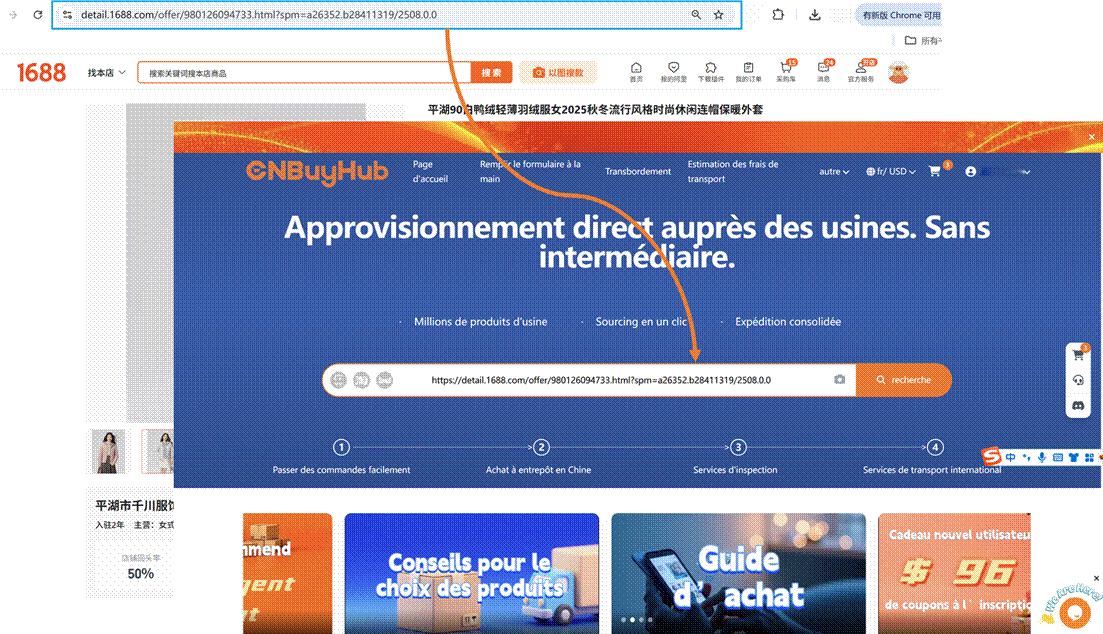
Trouvez le produit que vous souhaitez acheter, copiez le lien et collez l'URL du produit dans la barre de recherche.
🔍 Method 2
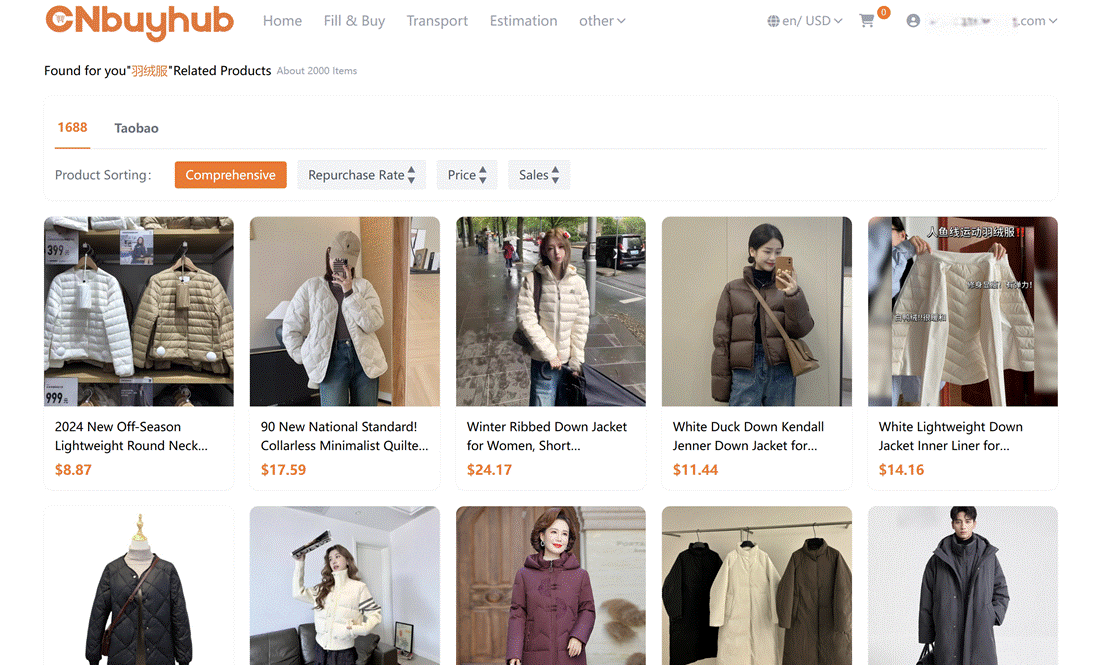
Enter the product name in the Superbuy search box and choose from the recommended products on Taobao, Tmall, or 1688.
Étape 2 : Soumettre une demande d'achat
✨ Method 1
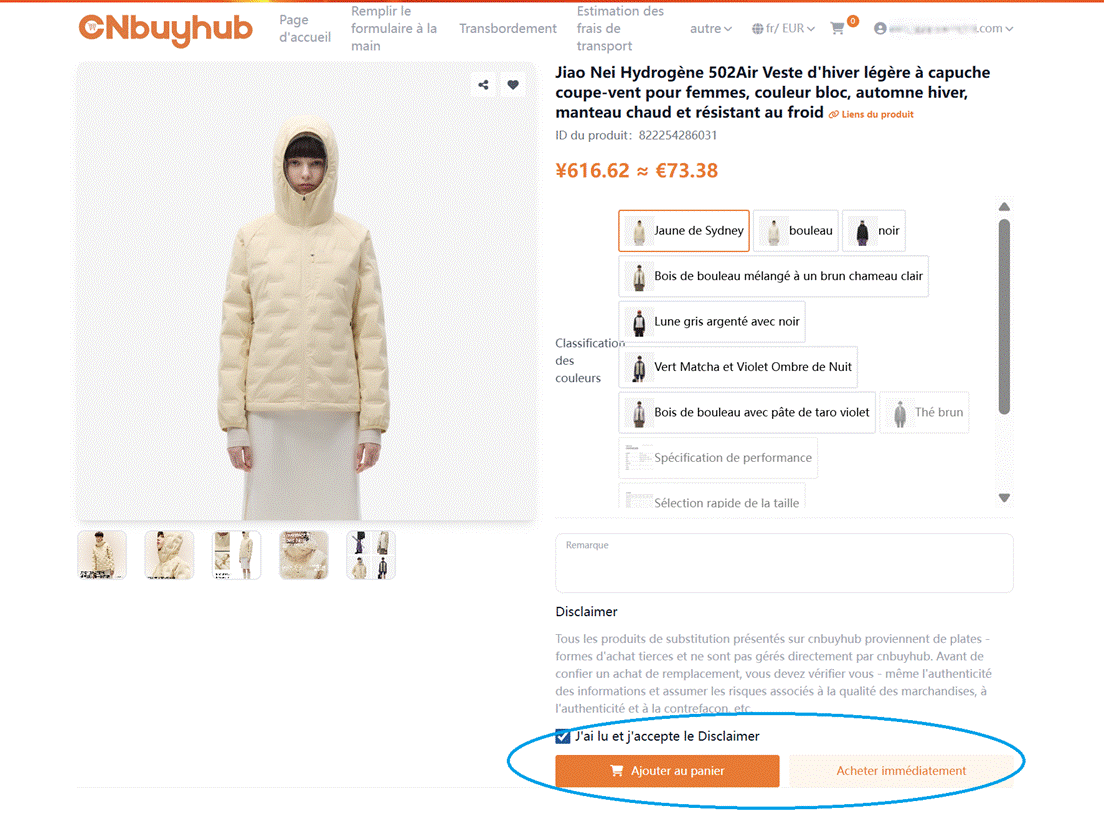
CNBuyHub can fetch information for 99% of products on Taobao, Tmall, and 1688.com. You can directly select the product's color, size, and quantity, then click "Add to Cart" or "Buy Now."
📝 Method 2
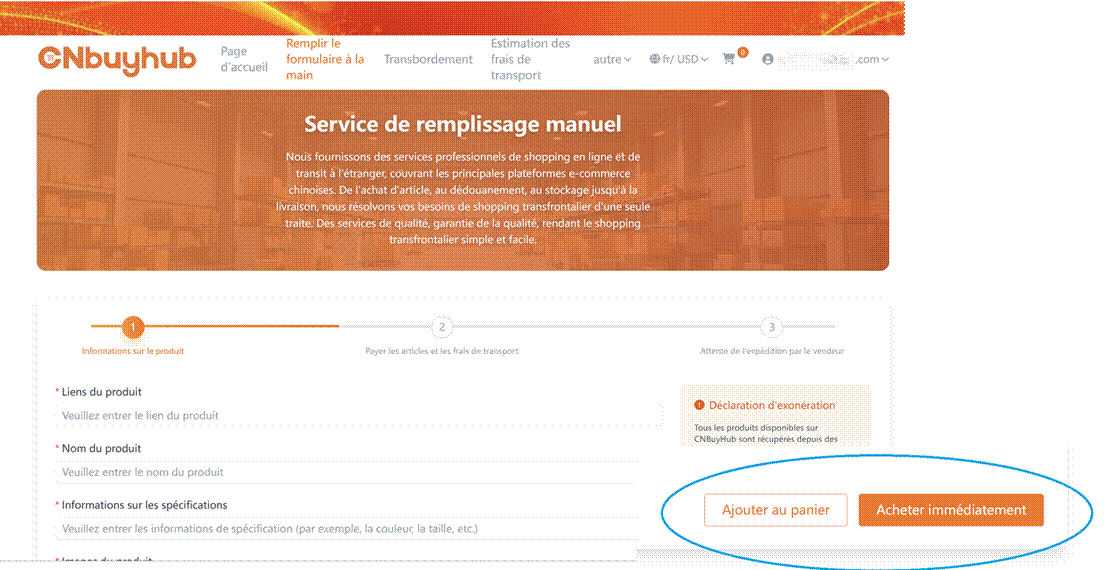
Lors de l'achat de produits sur les plateformes ci-dessus, si une page « Formulaire d'achat » apparaît, vous devez remplir vous-même les informations de commande du produit, puis cliquer sur « Ajouter au panier » ou « Acheter maintenant ».
Étape 3 : Payer le produit
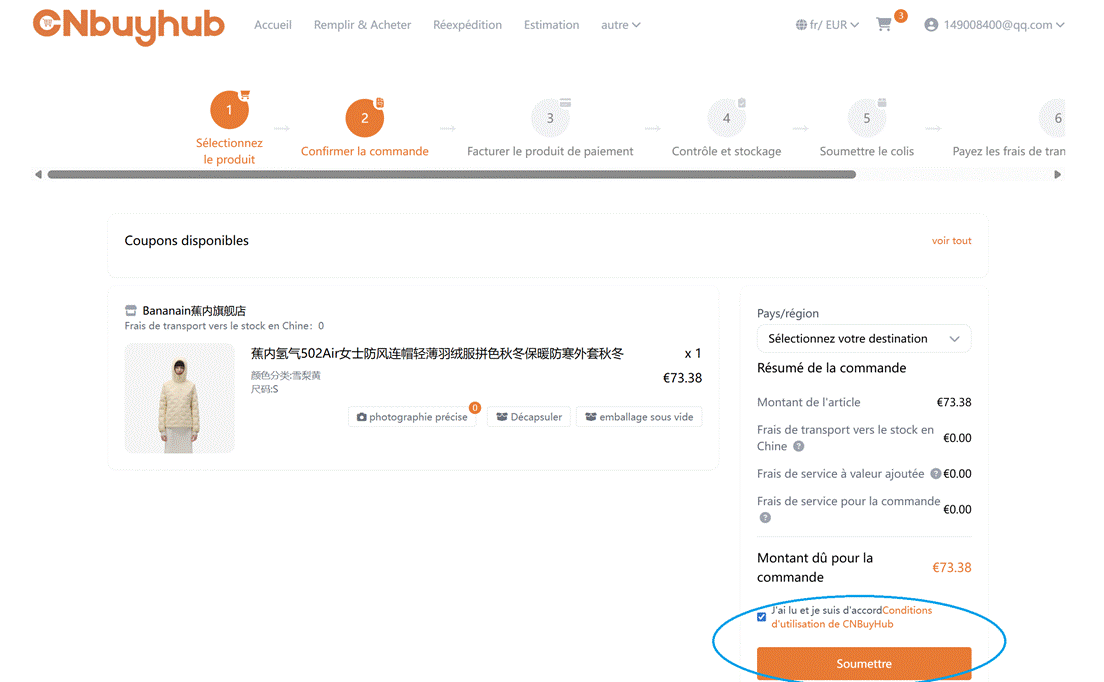
Choisissez votre méthode de paiement et payez le prix du produit ainsi que les frais de livraison depuis la Chine continentale.
💡 TIPS
- Prend en charge plusieurs devises, y compris les devises étrangères et le RMB.
- Méthodes de paiement : PayPal, solde de compte, virement bancaire.
- Indiquez le pays de livraison et vos remarques d'achat. Si des services supplémentaires sont nécessaires, cochez les options correspondantes et soumettez la commande après vérification.
Étape 4 : CNBuyHub achète le produit
CNBuyHub contactera le vendeur pour commander le produit pour vous.

Étape 5 : Inspection & Entreposage par CNBuyHub
Les produits sont inspectés, pesés et stockés dans l'entrepôt. Après l'entrée en stock, ils apparaîtront sous “Mon CNBuyHub” → “Mon Entrepôt.”
📦 TIPS
- Nous effectuons une inspection professionnelle stricte lors de l'entrée en stock et prenons des photos des produits pour votre vérification. Tout problème sera signalé et résolu rapidement.
- Le standard d'inspection pour les produits 1688 diffère des autres produits. Pour plus de détails, voir la description du service d'achat 1688 de CNBuyHub. www.CNBuyHub.com/index/help/index.html?id=149 →
- Vous pouvez soit soumettre les produits en entrepôt pour expédition internationale (Étapes 6–9), soit acheter plus de produits et les combiner avant l'expédition (répétez les Étapes 1–5, puis continuez Étapes 6–9).
- Notre entrepôt offre 90 jours de stockage gratuit.
- Combiner plusieurs produits dans un seul envoi permet d'économiser sur les frais de transport international.
Étape 6 : Soumettre un colis
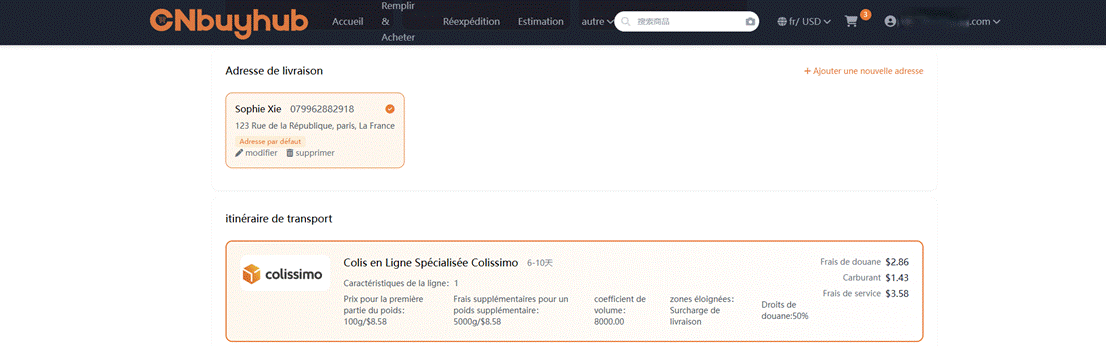
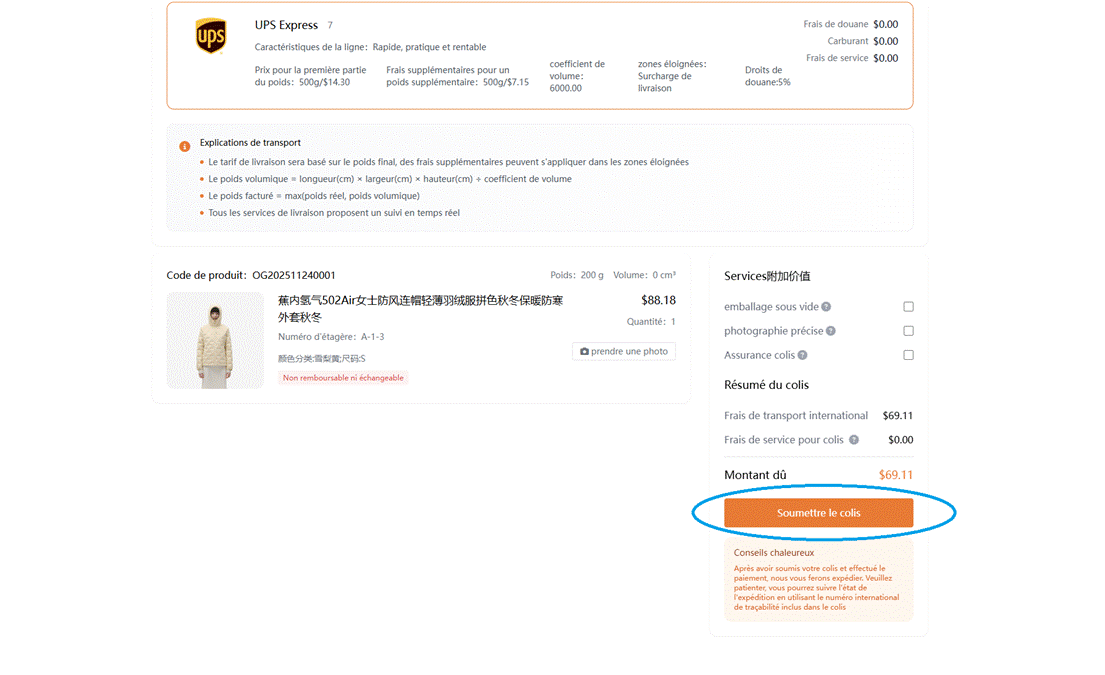
Dans “Mon Entrepôt”, sélectionnez les produits et cliquez sur Soumettre le colis, remplissez l'adresse du destinataire à l'étranger et choisissez parmi les options de livraison recommandées.
📌 TIPS
- Certains produits sont soumis à des restrictions d'expédition et toutes les options logistiques ne sont pas disponibles. Nous filtrons les options utilisables pour vous.
- Nous proposons des services de conditionnement, renforcement et assurance. Si nécessaire, nous emballerons selon vos instructions.
Étape 7 : Vérification du colis
Après réception de votre demande de colis, CNBuyHub vérifiera les produits et le mode d'expédition sélectionné. Si vos articles ne peuvent pas être expédiés ensemble (ex. produits ordinaires et sensibles), de nouvelles suggestions d'itinéraire seront fournies.
Étape 8 : Payer les frais de transport international
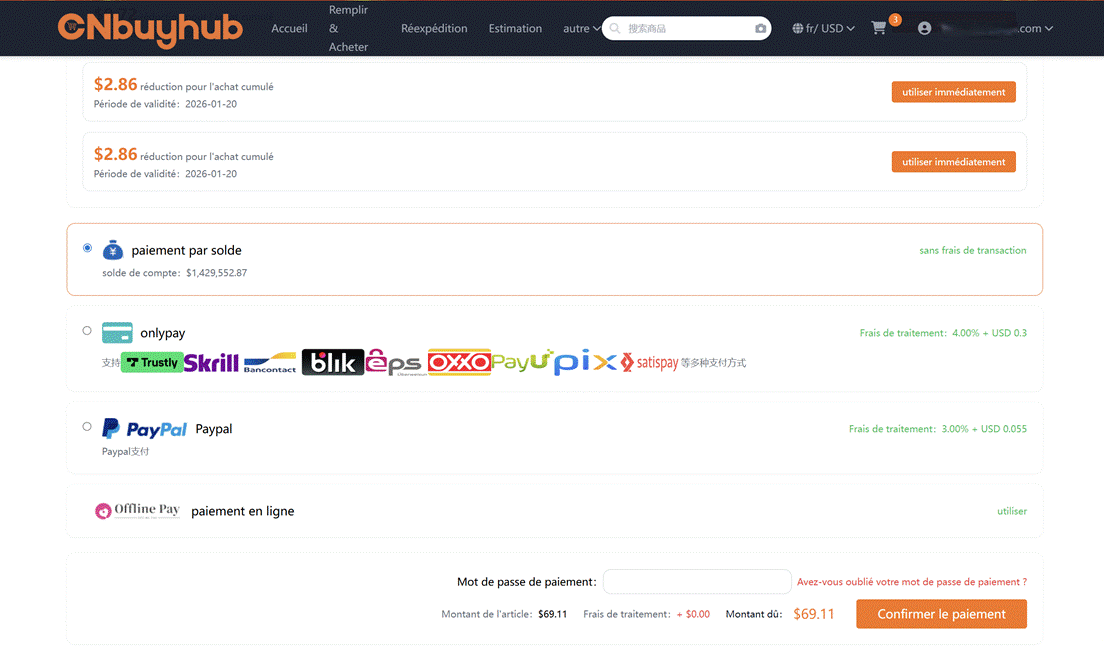
Choisissez un mode de paiement et payez les frais de transport international et les frais de douane.
✈️ TIPS
- Le dépôt pour le transport international est calculé selon le poids estimé, le mode de livraison choisi et la destination.
- Les frais finaux sont basés sur le volume et le poids du colis vérifiés par le transporteur. Toute différence avec le dépôt sera remboursée sur votre compte CNBuyHub après l'expédition.
Étape 9 : Expédition par CNBuyHub
Les produits sont combinés, emballés, renforcés, pesés et expédiés.
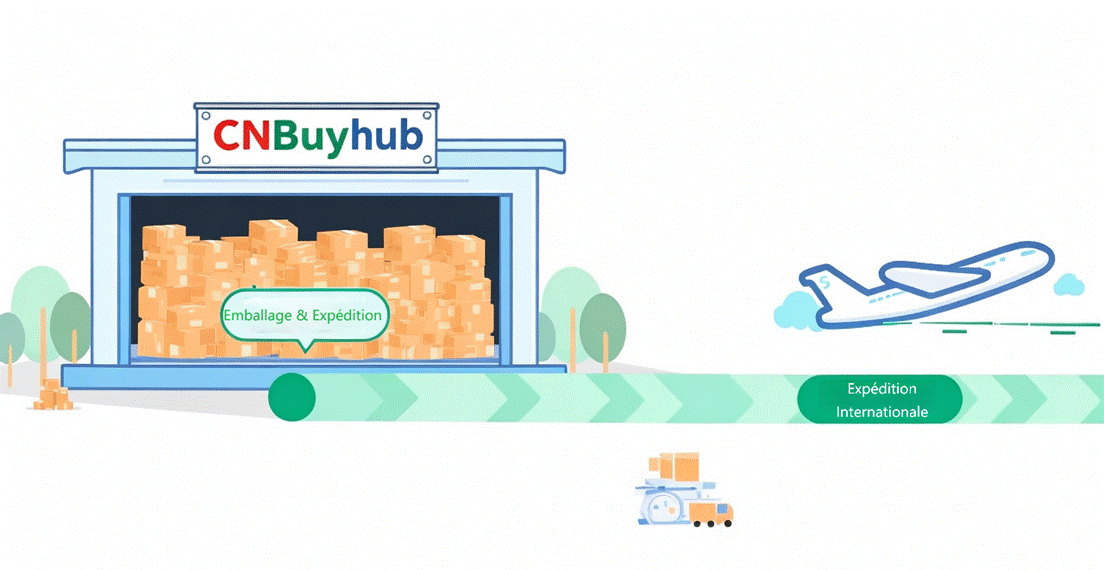
💡 Après expédition, vous pouvez suivre le colis sous “Mon CNBuyHub” → “Mes colis.”
Étape 10 : Attendre la livraison
Suivez la progression de l'expédition dans la liste des colis.
⚠️ TIPS
- Lors de l'expédition internationale, des événements inattendus peuvent survenir : retards, confiscations, taxes douanières, dommages ou pertes. CNBuyHub ne peut pas contrôler les services des transporteurs ou des douanes. Toutefois, CNBuyHub vous informera à l'avance des risques potentiels et vous assistera en cas de problème.
Étape finale : Réception & évaluation
Après réception du colis, confirmez la réception dans “Mon CNBuyHub” → “Mes colis.” En cas de problème, contactez le service client pour l'assistance après-vente.